
A repeater that puts only voices on the talkgroup
TailChaser is repeater software for FM repeaters and simplex nodes on a reflector talkgroup, on a Raspberry Pi with a sound card and a radio. It listens for a voice before it passes an over on, brings every station to the same level, and sits on a talkgroup next to SvxLink nodes without either noticing the difference.
One source tree, five small programs
Pick the one that matches the site. Their configuration files look alike, and each has only what its site needs.
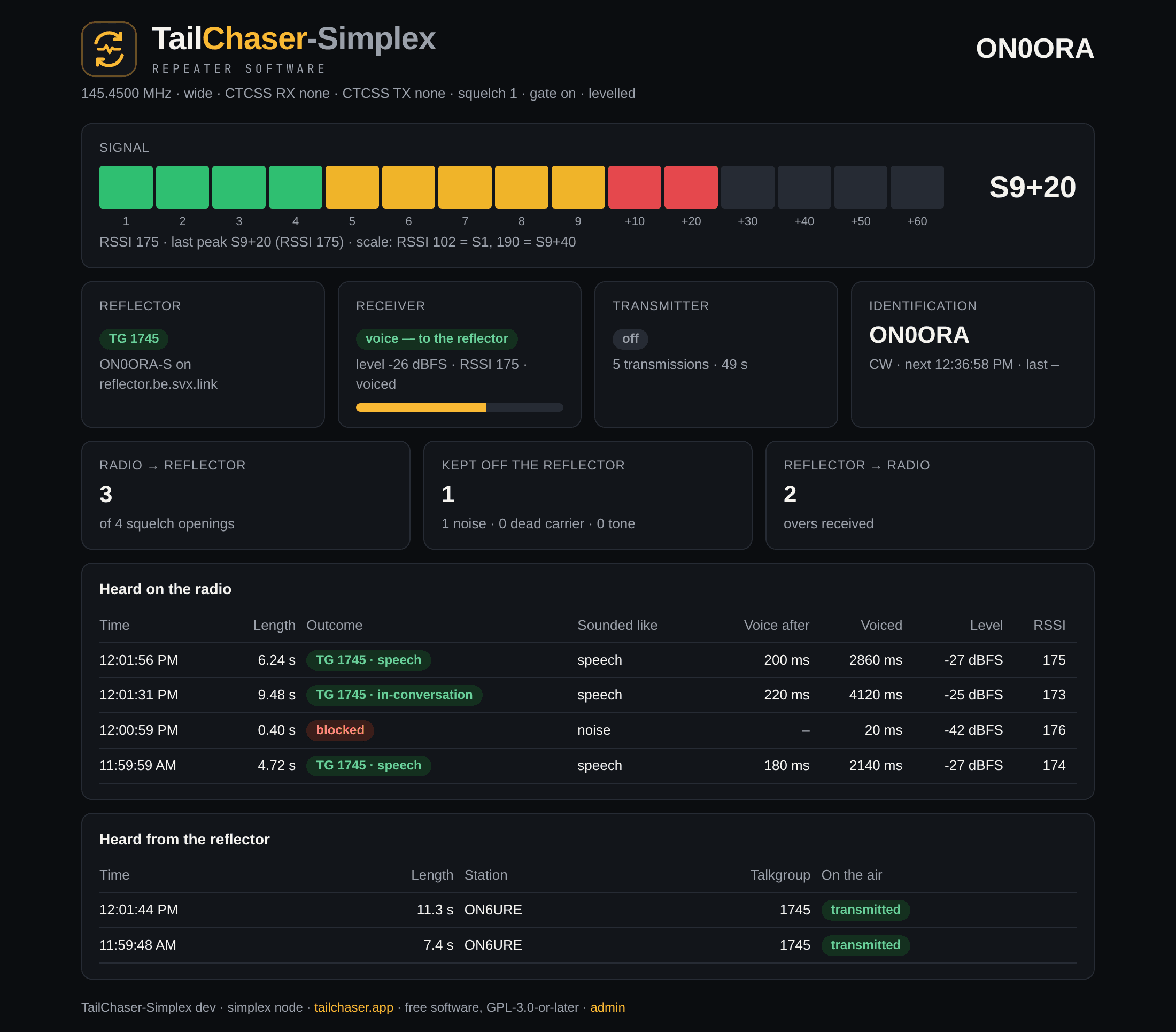
TailChaser-Simplex
tailchaser-simplex
A simplex node: one radio, one frequency.
- Receiver
- Transmitter
- Reflector link
TailChaser-Duplex
tailchaser-duplex
A repeater in one box.
- Receiver
- Transmitter
- Repeater logic
- Reflector link
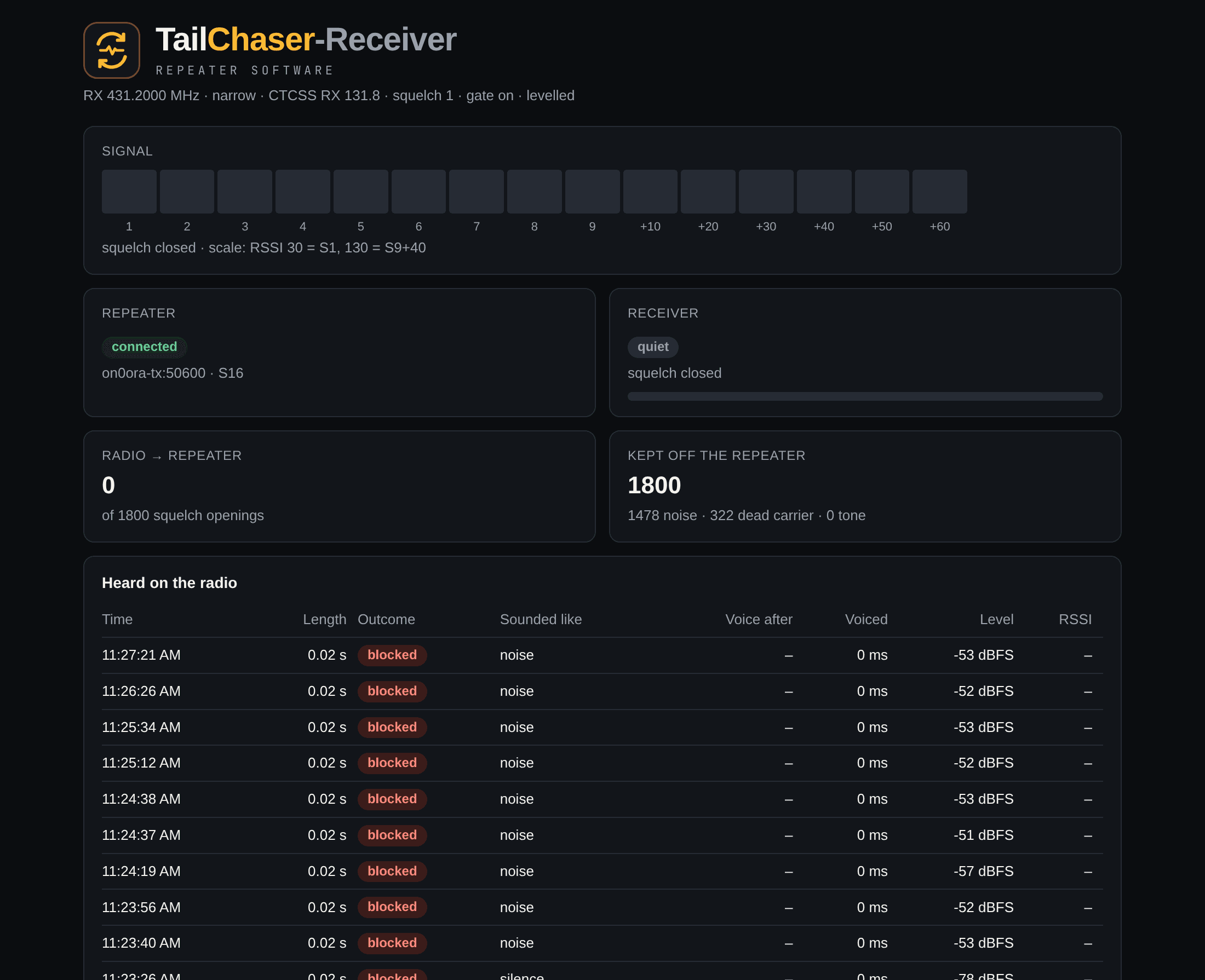
TailChaser-Receiver
tailchaser-receiver
The receive site of a split repeater.
- Receiver
- Serves it to the transmit site
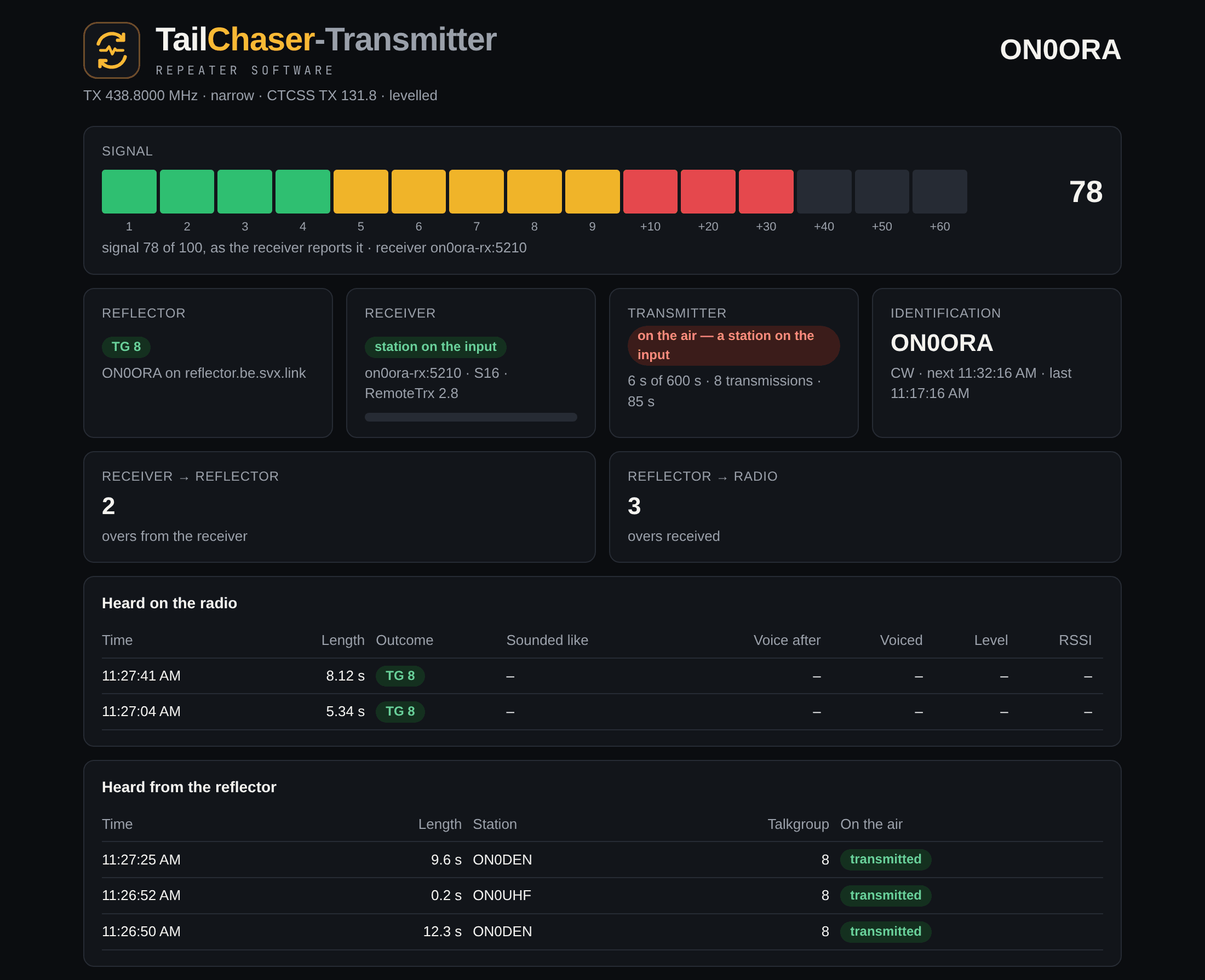
TailChaser-Transmitter
tailchaser-transmitter
The transmit site of a split repeater.
- Transmitter
- Repeater logic
- Reflector link
- Its receiver over the network
TailChaser-SDRReceiver
tailchaser-sdrreceiver
An extra receiver, anywhere. No radio: it listens on a web SDR.
- OpenWebRX, KiwiSDR, Web-888 or UberSDR
- Serves it to a repeater or node, which votes
The path of an over, in tailchaser-duplex
Received
- Radio
- Sound card
- Gate
- Normaliser
- Opus
- Reflector
Transmitted
- Reflector
- Opus
- Queue
- Shaper
- Sound card
- Radio
What passes the gate also goes straight to the repeater's own transmitter. The transmit side adds the TX delay, the hang time, the roger beep, the time-out and the Morse identification. On a split site the same path is cut in two: tailchaser-receiver has the gate and the normaliser and serves its audio over RemoteTrx (TCP port 5210) to tailchaser-transmitter, which repeats it and does everything on the transmit side. tailchaser-sdrreceiver is a receive site without a radio: the same gate and normaliser, on the audio of a web SDR.
On the air at ON0ORA
A split repeater: the receiver on 431.200 MHz at one site, the transmitter on 438.800 MHz at another, on talkgroup 8. Each program serves its own status page.
The talkgroup only hears a site when somebody is actually talking
The radio's squelch says “there is a carrier”, not “there is a voice”. The gate listens first: audio is kept in a look-back buffer, and the over is passed on, from its first word, once a voice is heard on it. Dead carriers, kerchunks, noise bursts and 1750 Hz tones stay local.
After an over that passed, the channel is in conversation for a while and the next over passes at once.
- on
- only overs with a voice go to the talkgroup, from their first word
- monitor
- everything passes, and the log says what would have been blocked
- off
- a plain squelch
rx: 4.72 s passed — voice after 180 ms, stream delay 180 ms
    [speech, voiced 2140 ms, level -27 dBFS, rssi 121] -> TG 8rx: 0.42 s BLOCKED — no voice
[noise, voiced 0 ms of 380 ms loud, level -31 dBFS, peak -24 dBFS]net: ON4ABC on TG 8, 12.3 s — transmittedtx: off after 13.6 s- 99.6 %
- of 32 128 squelch openings in 36 days were shorter than 2 s: noise, not people
- 0
- false passes on eight kinds of noise, dead carrier and tone, cut into openings of 0.5, 1 and 3 s in the lab
- 114 / 114
- three-second overs detected as speech at every noise level, from clean down to 0 dB above the noise
- ≈ 0.3 s
- to recognise a clean voice (267 and 288 ms for the two lab voices); the look-back buffer still sends the first word
Level is only a floor
Below −50 dBFS a frame is silence. Loudness is never evidence of speech: squelch noise is louder than a voice, and a strong dead carrier is quieter than a soft one.
Pitch
Every 20 ms the last 40 ms of audio is searched for a pitch of 75 to 400 Hz, the rate of the vocal cords. Voiced speech averages 0.8 on that scale, squelch noise 0.25.
Not a single sine
A 1750 Hz tone or a whistle is periodic too. Spectral purity and the shape of the autocorrelation tell a sine from a voice, also when it is buried in noise.
Not steady
Across the voiced frames the pitch or the level has to move, as it does within a syllable. Mains hum and steady tones do not.
Minimum duration, audio level and RSSI each fail on one of the three things to keep out. Positive evidence of a voice is the only test that covers them all. The numbers come from 36 days of the ON0ORA receiver's log and from a lab corpus of recorded speech in modelled squelch noise; one case did get through there, a steady 400 Hz tone only 6 dB above heavy noise. The method, the measurements and what the lab does not show are in DETECTION.md.
What they all have in common
And what a site needs around it: the login, the identification, the squelch and the hardware.
Every site equally loud
Stations arrive at very different levels. Before received audio goes anywhere, each over is brought to one speech level. The gain follows the loud parts of speech, drops fast and rises slowly, so pauses are not pumped up.
A transmitter that cannot get stuck
The PTT line is pinned inactive before anything else is set up, a time-out limits every transmission, and the daemon exits when the sound card stops. Whatever happens, the service releases PTT and the amplifier line afterwards.
One kind of configuration file
/etc/tailchaser/<role>.conf: the same sections with the same meaning in every program, each with only the sections for the parts it has. A file with its REQUIRED lines still commented out is refused, so a box that was not set up does not transmit.
A status page in every program
On port 8080: the links, an S-meter, the last overs with what the gate made of each, and what was transmitted. On the same port, an admin portal and an API with keys.
Certificate login, by itself
On its first connection the node makes a key and sends a signing request. Once the reflector's sysop has signed it, the node logs in on its own and renews in time. Passwords still work for reflectors that use them.
The reflector is checked too
Its CA is kept from the first connection, and from then on the reflector has to show a certificate from that CA made out to its name. A node that holds a certificate refuses to fall back to the unencrypted protocol.
Talkgroups, with priorities
A home talkgroup and monitored ones in SvxLink notation. When somebody talks on a monitored talkgroup and the node is idle, it switches there. DTMF 91<talkgroup># selects one, as on an SvxLink node.
Morse on the clock
The callsign goes out in Morse every hour, every quarter, or whatever the licence asks. On a repeater it is sent over what is on the air, 6 dB quieter while somebody is talking.
A voice, from your own text
Spoken announcements with %CALL, %TIME and %DATE in them, turned into speech once a day by an online voice service (an OpenAI-compatible one, or ElevenLabs) and played in a quiet moment, or under the conversation.
A tone squelch in software
For a receiver without a CTCSS decoder, or one that gives nothing but audio. It finds the tone in about 0.3 s and holds the audio back by as much, so the first word is kept and the noise tail is not passed on.
Any radio, and the SA818 by itself
An SA818 module is programmed by the daemon over its serial port: frequency, tones, squelch, filters. type = none is for any other radio, of which only the audio and the squelch and PTT lines are used.
More than one receiver
A repeater or a node takes other receivers besides its own and votes: the first to hear a station has the over, and a clearly better one takes it. One of them can be a web SDR, with no radio at all.
Listening in
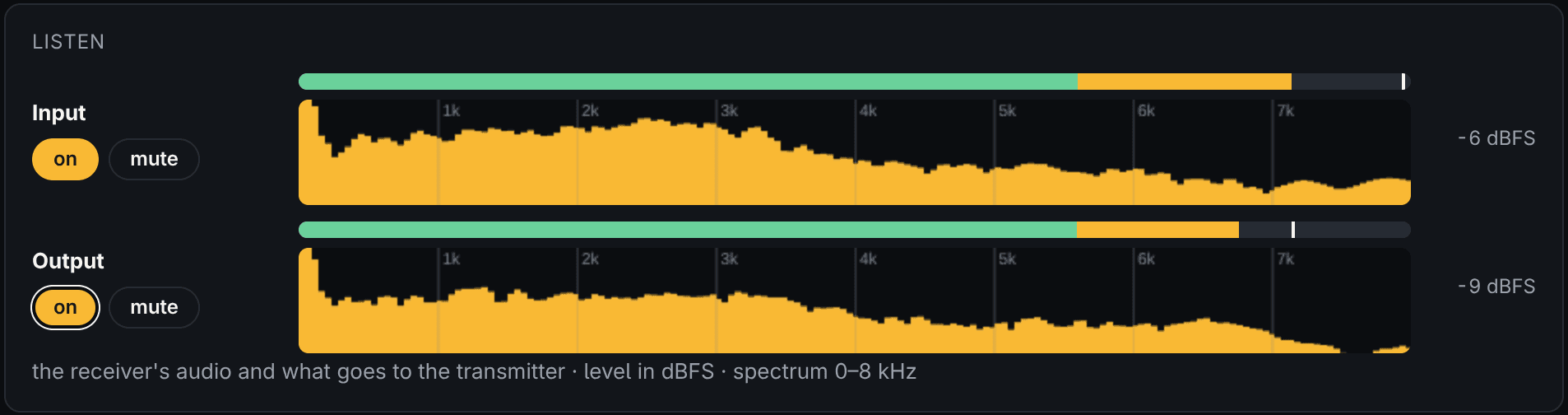
With [status] monitor = true the status page gets a Listen card under the signal meter: the audio of the receiver, squelch open or not, and of what goes to the transmitter, each with a level meter, a spectrum and a mute button. For finding out why something sounds the way it does. Off unless you turn it on.
The station, on the reflector
With its login the node sends its node information, as SvxLink does: place, sysop and position, the frequency, the CTCSS tone and which tone opens the home talkgroup. You add what it cannot know: power, antenna and height.
An amplifier, sequenced
A second output switches a power amplifier just before PTT and releases it just after. With a delay it is a sequencer: the exciter first, the amplifier some milliseconds later, and off again before the exciter.
The repeater roles
tailchaser-duplex and tailchaser-transmitter are repeaters. This is how they behave on the air.
On the air
- What a station says on the input is transmitted again and sent to the talkgroup; what is said on the talkgroup is transmitted.
- A station on the input wins. A talkgroup over that arrives while somebody is on the input is not transmitted, and the log and the status page say so.
- The carrier comes up 300 ms before the audio and stays up 3 s after the last of it. Nothing is lost: the audio waits.
- Which repeater is coming from the network is sent in fast Morse before it is heard, at 34 wpm: ON0OST becomes OST. Only when it is another repeater than the one announced last, and other stations get none: the roger beep already says “network”. The speech waits in a buffer meanwhile.
- One level on the transmitter. Talkgroup audio is levelled like a station on the input, announcements and Morse have their own fixed levels. What is left to set per site is the deviation, once.
- The time-out counts for as long as the transmitter is busy without a pause. After it the carrier drops until whoever was talking has stopped.
A roger beep that says where from
- “blop”
- after a station on the input
- “bleep blop”
- after an over from the talkgroup
Morse, and a voice
The callsign in Morse on the clock, and announcements from your own text. The two clocks are independent: this is Morse every quarter, and the voice on the hour right after it.
[ident]interval_min = 15[announce]enabled = trueinterval_min = 60with_ident = truetext = "This is %CALL, the repeater of Opwijk. It is %TIME."A split repeater
The receiver on one site, the transmitter on another. The transmitter connects to the receiver and reconnects by itself. The link carries uncompressed audio by default, fine on a LAN, or Opus for a slow link.
tailchaser-receiver speaks SvxLink's RemoteTrx protocol, so it also serves an SvxLink repeater with a TYPE=Net receiver.
[uplink]listen_port = 5210auth_key = a-long-shared-secret[radio]freq_rx = 431.2000ctcss_rx = 131.8[reflector]domain = be.svx.linkcallsign = ON0XXXdefault_tg = 8[receiver]host = on0xxx-rx.example.orgauth_key = a-long-shared-secret[radio]freq_tx = 438.8000ctcss_tx = 131.8[ident]callsign = ON0XXXMore receivers: voting, and a receiver on a web SDR
A repeater or a node can listen with more than one receiver. Besides its own it takes up to three or four others: a tailchaser-receiver on another hill, or a receiver without a radio.
TailChaser-SDRReceivertailchaser-sdrreceiver
A receiver without a radio. It listens to one FM channel on a web SDR and serves what it hears the way a tailchaser-receiver does. It needs no hardware and can run on the same box as the repeater, or anywhere else.
- Web SDRs
- OpenWebRX and OpenWebRX+, KiwiSDR, Web-888 and UberSDR. One connection, narrow FM on [sdr] freq: for a repeater that is its input frequency.
- A good guest
- It is one of the SDR's listeners, all day: ask the owner. It never changes what listeners share. On an OpenWebRX with several devices it moves its own connection to the device that is on the band, and waits when none is.
- Squelch
- A web SDR gives audio only, so the squelch is made from it: an FM receiver without a carrier hisses, a carrier quiets it. [ctcss] detect adds the tone, so it opens for the same stations as the repeater.
- Signal strength
- From the same hiss: full quieting is 100. That is what the repeater votes with.
- Then
- The same as a receive site: the gate (a voice, not a carrier), levelling, DTMF, the RemoteTrx link on port 5211 and a status page on 8081.
Tested, and not yet
OpenWebRX is tested on a live receiver. KiwiSDR, Web-888 and UberSDR are written from their source code and tested against stand-ins only, not against the real thing yet.
Voting
In tailchaser-transmitter, -duplex and -simplex
- The receiver that hears a station first has the over.
- Another one takes it when it hears the station clearly better for a while. That can be turned off.
- A receiver on the internet is late, a web SDR by a second or two. What it still brings of an over that has ended on another receiver is the same over, and is not repeated. Only when it goes on for longer than it was late is it a station the other receiver lost. How late each receiver is, is learnt as it goes.
- On a simplex node the other receivers hear the node's own transmitter, late: they are not listened to during a transmission and for a while after it.
The status page and the API say which receiver has the over and how many each has had; the log says where every over came from.
[sdr]type = openwebrxurl = https://sdr.example.orgfreq = 431.200 # the repeater's input[ctcss]detect = truetone = 131.8[uplink]listen_port = 5211auth_key = a-long-shared-secretListen to the input and the output, in the browser
For setting a node up and for finding out why something sounds the way it does: is the hiss there, is the tone, what does the normaliser make of a quiet station, what does an announcement sound like before the radio.
- Input
- The audio of the receiver, all of it, squelch open or not. On a transmit site it is the receiver that has the over.
- Output
- What goes to the transmitter, before the radio. A receive site and the SDR receiver have an input only.
- A meter and a spectrum
- Each has a level meter in dBFS with a peak mark and a spectrum of 0 to 8 kHz. Muted, they keep running.
- Off unless turned on
- [status] monitor = true. Whoever can open the status page can then listen, four listeners at most.
The streams are websockets, /monitor/rx and /monitor/tx: 16-bit mono PCM at 16 kHz, so a script can record them too.
Calibrate the audio without test equipment
Getting a repeater to sound like the others on the talkgroup normally takes a deviation meter or a service monitor. TailChaser needs neither: a web SDR that hears the transmitter is enough. It comes down to two things, and only one of them is yours to set.
Every source has one level
Nothing to set. Whatever is transmitted is brought to the same level before it reaches the modulator.
- A station on the input
- normalised to one target, per over
- Audio from the talkgroup
- normalised to the same target, looking 100 ms ahead
- Spoken announcements
- their own fixed level
- Morse, roger beep, test tones
- their own fixed level
A quiet station, a loud one, an SvxLink node that sends 10 dB too little: on the air they are alike, and there is no gain per source to tune.
The deviation: set once, measured in Hz
What is left is how far full level swings the transmitter. devcal.py measures that on a web SDR and says what to change.
$ python3 tools/devcal.py --sdr http://your.websdr.example/ \ --profile 70cm --freq 438.800 --ctcss 131.8 --max-dev 2500 \ --trigger "ssh node sudo systemctl kill -s USR1 tailchaser-transmitter"carrier +1030 Hz off (transmitter and SDR together)
CTCSS 131.8 Hz 266 Hz deviation
test tone 1000 Hz 625 Hz deviation at -20 dBFS
full level (0 dBFS) would be 6250 Hz — wanted 2500 Hz
change the transmit level by -8.0 dB: [tx] level_db -8.0 from what it is nowSet [tx] level_db, run it again, and it says “that is right”. That is the whole alignment.
The tools
- devcal.py
- The deviation of your transmitter in Hz, measured on any OpenWebRX receiver that hears it, and what to change to get it right. It listens only: it never switches the SDR's band profile for anybody else.
- sdrmon.py
- The other question, how you sound next to the neighbours: it tunes your repeater and reference repeaters in turns and prints speech level, peaks, bass, mid and treble balance and the CTCSS tone. Its numbers compare stations on the same receiver; they are not kHz.
- Level in the log
- Every over is logged with its level, for talkgroup audio and for a station on the input: one number to compare the two paths with.
- ctcsstest
- On a recording of the receiver: whether the tone squelch would open, the tone's level and margin, and the two numbers the noise signal meter needs.
- agctest, gatetest, vadtest
- What the normaliser and the gate would have done with real overs, before you change a live repeater.
- Status page
- Live: receive level, tone level and margin, noise level, normaliser gain and the S-meter.
Exact, without a calibrated receiver
The SDR listens to the carrier in SSB. There an FM signal is a row of tones: the carrier and, one tone frequency apart, its sidebands. How strong the sidebands are next to the carrier depends on the deviation alone (Bessel functions), not on the SDR's gain, its AGC or how strong the signal is. The test transmission sends 1000 Hz at a known level with receiver and talkgroup muted, so nothing else is in it.
Three signals put something on the air, each in a quiet moment
- USR1
- Test tones: 1000 Hz, then 700 + 1900 Hz, with receiver and talkgroup muted meanwhile
- USR2
- The next spoken announcement, now
- RTMIN+1
- This repeater's call in fast Morse, as other repeaters send it
An admin portal, and an API with keys
On the same port as the status page: the configuration in a browser, and a way for a display, a knob on the desk or a script to read what a node is doing and to block it from far away.
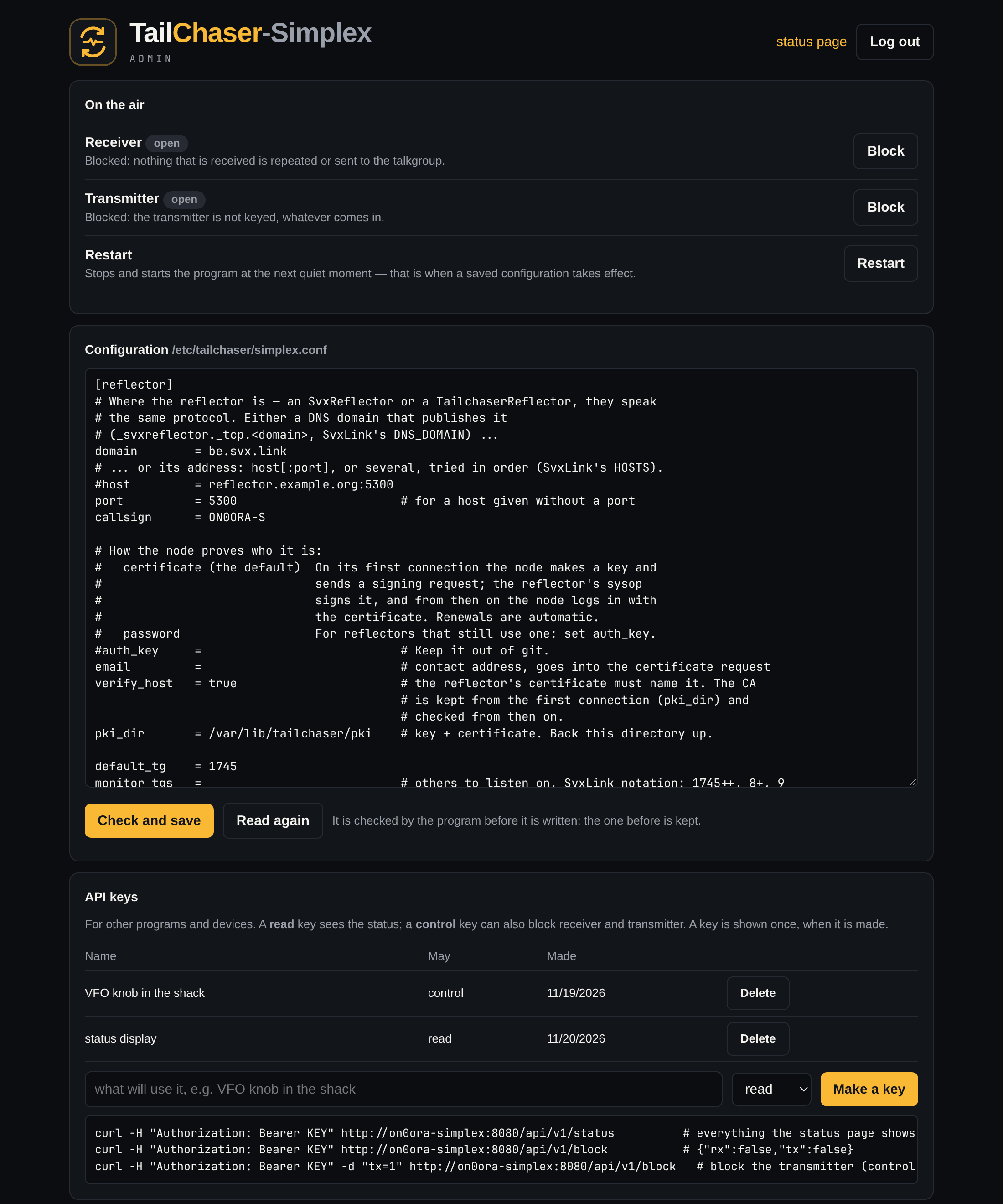
The portal http://node:8080/admin
- Log in
- One user, admin. On a new node the password is admin; the first login has to change it before anything else opens, and that first login works from a private address only: the local network, a VPN.
- Configuration
- The node's configuration file in the browser. Check and save lets the program itself check it first; what it refuses is not written, and the file before is kept.
- Restart
- At the next quiet moment. That is when a saved configuration takes effect.
- Block
- The receiver: nothing it hears is repeated or sent to the talkgroup. The transmitter: it is not keyed, whatever comes in. A block stays, also over a restart or a power cut, until it is released.
- API keys
- For other programs and devices. read keys see the status, control keys can also block. A key is shown once; only its hash is kept.
The API
# everything the status page shows$ curl -H "X-API-Key: KEY" http://node:8080/api/v1/status# what is blocked: {"rx":false,"tx":false}$ curl -H "X-API-Key: KEY" http://node:8080/api/v1/block# block the transmitter (a control key)$ curl -H "X-API-Key: KEY" -d "tx=1" http://node:8080/api/v1/blockEvery answer is JSON, and the answer to a block is the state after the call. HTTP/1.0 is enough, with no TLS and no chunked encoding, so a microcontroller can speak it. The whole of it is in API.md.
A split repeater has one address: the transmit site
It fetches its receive site's status and passes it on in its own as remote_receiver, and blocking the receiver there blocks what comes from the receive site. The signal strength of the receiver that has the over is in gate.rssi, so a display reads the same field on every program, and voter says which receiver that is.
It is plain HTTP: keep it on the local network or a VPN, or put a TLS proxy in front of it. [status] admin = false turns the portal and the API off.
Your repeaters, on a knob on the desk
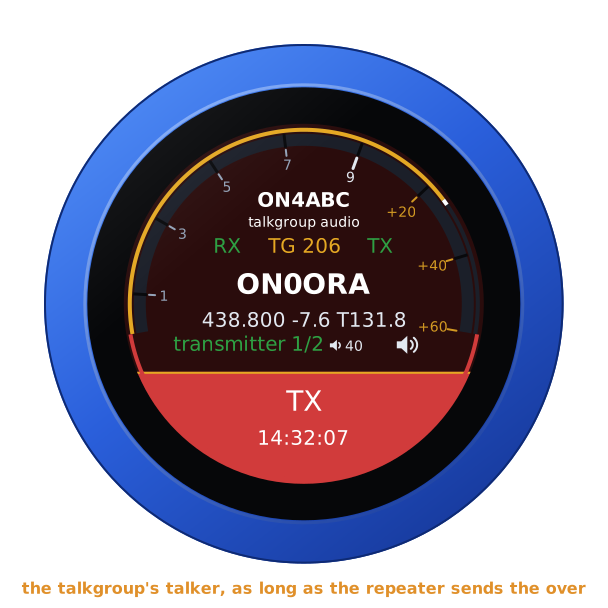
RF.Guru's VFO Knob has a TailChaser firmware: a remote for TailChaser repeaters, over the API above. It watches them, plays what they transmit and blocks their receiver or transmitter.
A repeater a detent. Up to eight, every one read all the time, so a turn shows the next at once. One that becomes busy comes up by itself.
Who is talking. The talkgroup's talker while the repeater sends the over, LOCAL for a voice on its input, CARRIER for a signal with no voice, or who spoke last and how long ago.
The repeater's ear. Its received signal on the S-meter, in S-points on TailChaser's own scale; TX in red while it is keyed.
Listen. What the repeater shown transmits, on the jack or a Bluetooth headset or speaker. That needs [status] monitor = true on the node.
Block RX or TX. The repeater's receiver or transmitter blocked, or opened again, with a tap each. The knob itself never transmits.
From anywhere. On the LAN, over the internet, or over your own Tailscale tailnet, which the knob joins as a device of its own.
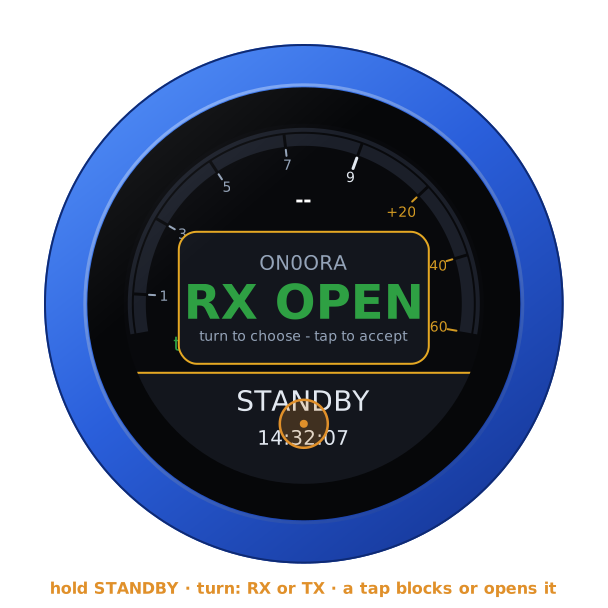
What it needs. An API key for each repeater, made in its admin portal: a read key watches, a control key may also block. To hear one, [status] monitor = true in its configuration.
How it differs from SvxLink
TailChaser is not a fork of SvxLink and contains none of its code. It speaks SvxLink's protocols, so the two mix freely on a talkgroup and on a split site. What is different is the scope and the defaults.
| Subject | SvxLinkSM0SVX and contributors | TailChaserRF.Guru |
|---|---|---|
| What it is | A general voice-services framework: logics, modules (EchoLink, parrot, voice mail…), TCL event scripts | One job: an FM repeater or simplex node on a reflector talkgroup |
| Programs | svxlink + remotetrx, one big configuration | Five programs with configurations that look alike; each has only what its site needs |
| What reaches the talkgroup | Whatever opens the squelch | Only a voice: a gate with a voice detector keeps noise, dead carriers and tone bursts off the reflector |
| Levels | Set per site with gains; every node sounds different | Every over is levelled to one speech level before it goes anywhere |
| Squelch | Many detectors (CTCSS, SigLev, GPIO, …) with thresholds to tune | The radio's line, a CTCSS tone found in the audio, or both, with the audio held back so the first word and the noise tail are right |
| Signal meter | SigLevDetNoise or tone, calibrated with siglevdetcal | SA818 RSSI, or the receiver noise, calibrated from one recording |
| Identification | Spoken, from sound files and TCL | Morse on the clock; spoken announcements from text, made once a day by an online voice |
| Roger beep | TCL | Built in, and it tells you where the over came from: “blop” local, “bleep blop” network |
| Radio | Any, wired by you | Any, and an SA818 module is programmed by the daemon itself |
| Setting up the audio | An oscilloscope, a deviation meter, or patience | Every source is levelled by itself; the deviation is measured in Hz on any web SDR and the tool says what to change |
| Watching and running it | Log file, an editor over ssh | A status page in every program, an admin portal (configuration, restart, block receiver or transmitter), an API with keys |
| Moving over | — | bootstrap.sh … replace-svxlink reads SvxLink's files, takes key and certificate along, and rollback goes back |
| Size | C++, TCL, sound packs | About 14 000 lines of C, no interpreter in the daemon |
What SvxLink has and TailChaser does not: modules, EchoLink, voice announcements from sound packs, APRS, scripting and DTMF command trees beyond talkgroup selection.
Install it
Four steps on a Raspberry Pi. A box that was not set up does not transmit.
- 1
Clone it on the Pi
Raspberry Pi OS or Debian, Bookworm or Trixie, with a WM8960 Audio HAT and the SA818 on /dev/serial0. Other sound cards and radios work too.
- 2
Run bootstrap.sh with the role
simplex, duplex, receiver, transmitter or sdrreceiver. It installs what is needed, builds the program and sets up its service.
- 3
Fill in the REQUIRED lines
The reflector, the callsign, the talkgroup and the frequencies. Until they are filled in the program refuses to start: no restart loop, no carrier.
- 4
Reboot, and open port 8080
Once the reflector's sysop has signed the node's request it logs in by itself, and the status page shows what it hears, what it passes on and what it kept off the talkgroup.
On the Pi
$ git clone https://github.com/Guru-RF/TailChaser && cd TailChaser$ sudo ./bootstrap.sh simplex # or duplex | receiver | transmitter | sdrreceiver$ sudo nano /etc/tailchaser/simplex.conf # the lines marked REQUIRED$ sudo rebootOn a box that already runs the program, bootstrap.sh <role> is an update: rebuild, install, check the configuration, restart. By hand it is make && sudo make install ROLE=simplex, and tailchaser-<role> -t -c FILE checks a configuration file.
Coming from SvxLink
One command takes the settings, the reflector key and the certificate over, stops the old program and starts the new one. If the new one does not log in on the reflector within a minute, the old one is put back.
- svxsimplexd (SVXSimplexRepeater)
- sudo ./bootstrap.sh simplex upgrade
- svxrxd (SVXRepeaterRX)
- sudo ./bootstrap.sh receiver upgrade
- SvxLink: SimplexLogic + ReflectorLogic
- sudo ./bootstrap.sh simplex replace-svxlink
- SvxLink's remotetrx
- sudo ./bootstrap.sh receiver replace-remotetrx
- Back to what ran before
- sudo ./bootstrap.sh <role> rollback
Not there yet
What TailChaser does not do today, said plainly.
Three of the four web SDRs, on the air
tailchaser-sdrreceiver is tested on a live OpenWebRX receiver. KiwiSDR, Web-888 and UberSDR are written from their source code and tested against stand-ins only.
A carrier squelch for a radio
A radio without a squelch line needs a CTCSS tone on its input. A noise squelch in software is there for a web SDR, not yet for the input of a sound card.
Taking over an SvxLink repeater
A simplex node and a remote receiver are taken over from SvxLink by one command. A repeater (RepeaterLogic) is not: write its configuration from the example and copy the key and certificate.
Modules
No EchoLink, parrot, voice mail, APRS, scripting or sound packs, and no DTMF command trees beyond talkgroup selection. SvxLink has those.
Specifications
- Programs
- tailchaser-simplex, -duplex, -receiver, -transmitter and -sdrreceiver, from one source tree
- Language
- About 14 000 lines of C; no interpreter in the daemon
- Runs on
- Raspberry Pi OS and Debian, Bookworm or Trixie; one systemd unit per program
- Reflector
- SvxReflector protocol version 3 (TLS with certificates, encrypted audio) and version 2 (password); Opus audio
- Split site
- SvxLink's RemoteTrx protocol on TCP port 5210; uncompressed audio (256 kbit/s) or Opus
- Receivers
- The one in the box or at the receive site, and up to three or four others over RemoteTrx, with voting; in simplex, duplex and transmitter
- Web SDR
- tailchaser-sdrreceiver on OpenWebRX and OpenWebRX+ (tested live), KiwiSDR, Web-888 and UberSDR (stand-ins only); squelch and signal strength from the hiss; serves on TCP port 5211, status page on 8081
- Radio
- SA818 module, programmed over its serial port, or any radio by audio and GPIO lines
- Sound
- ALSA; the mixer of a WM8960 Audio HAT is set by the program, other cards with alsamixer
- Squelch
- The radio's squelch line, a CTCSS tone found in the audio, or both
- Gate
- Voice detector on 20 ms frames, 300–3000 Hz, with a look-back buffer; on, monitor or off
- Normaliser
- One speech level for every over: target −20 dB, up to 30 dB of gain, on by default
- Transmit
- TX delay 300 ms, hang 3 s, time-out, optional software pre-emphasis and limiter
- Identification
- Morse on the clock; spoken announcements through an OpenAI-compatible service or ElevenLabs
- Status
- Web page and /status.json on port 8080, read-only
- Listening in
- Off by default. A Listen card on the status page: input and output, each with a level meter in dBFS, a spectrum of 0 to 8 kHz and a mute button. Websockets /monitor/rx and /monitor/tx: 16-bit mono PCM at 16 kHz, four listeners at most
- Admin and API
- /admin and /api/v1 on the same port, plain HTTP: one user, API keys with read or control rights; can be turned off
- Builds with
- libasound2, libopus, libgpiod (1.x or 2.x) and libssl
- Licence
- GNU General Public License, version 3 or later
Free software
GPL-3.0-or-later
Anyone may run it and work on it. Whoever distributes it, changed or not, ships the source with it under the same licence and keeps the names of those who made it.
Standing on shoulders
- SvxLink / SvxReflector, Tobias Blomberg SM0SVX and contributors: the reflector and RemoteTrx protocols TailChaser speaks. No SvxLink code is included.
- Opus (Xiph.Org), OpenSSL, ALSA, libgpiod: the codec, the TLS and the hardware underneath
- The sysops and stations of ON0ORA and ON0DEN: who ran it on the air first, keyed up on request and said how it sounded
- RF.Guru (Joeri Van Dooren ON6URE): the author
Where it comes from
TailChaser is the merge of SVXSimplexRepeater (svxsimplexd) and SVXRepeaterRX (svxrxd). Both can be upgraded in place.
Questions, answered
Is TailChaser a fork of SvxLink?
Can it sit on a talkgroup next to SvxLink nodes?
Does the gate cut off the first word?
How do I try the gate without taking a risk?
What hardware does it need?
My receiver has no squelch line. Will it work?
Can a repeater have more than one receiver?
Can I add a receiver without a radio?
A web SDR is a second or two late. Is everything repeated twice?
Can I hear what the node hears?
Can I go back to SvxLink?
Does it do EchoLink, a parrot or voice mail?
Can I switch a repeater off from far away?
Is the admin portal safe to put on the internet?
Can I test it without a radio?
What does it cost?
Every setting and command in the README, how the gate decides in DETECTION.md.
Running it on your repeater?
Tell us how it sounds. Bugs, ideas and recordings of overs the gate got wrong go to GitHub; add your name to AUTHORS with your first contribution.